
Introducing Multi-Profile & Family Wealth Aggregation
Transforming Arthavi from an individual investment tracker into a unified, privacy-first family wealth command center.
What is Family Wealth Aggregation?
Family wealth aggregation is the process of consolidating all financial assets—including mutual funds, stocks, EPF, gold, and cash—belonging to multiple household members into a single, unified net worth dashboard. This enables families in India to track combined asset allocations, identify sector or stock-level overlap risks across multiple PAN accounts, and monitor progress toward collective financial goals.
Managing personal finances is only half the battle. For many retail investors in India, wealth management is a household affair. Between tracking your direct stock portfolio, monitoring your spouse's mutual fund SIPs, maintaining minor accounts for your kids, and planning investments for elderly parents, the complexity multiplies exponentially.
Historically, solving this meant a spreadsheet nightmare or compromising security by sharing broker login details and OTPs. We knew there had to be a better way.
Today, we are thrilled to release **Multi-Profile & Family Portfolio tracking** on Arthavi. This update turns your secure dashboard into a comprehensive wealth hub, allowing you to track individual holdings while enjoying a beautiful consolidated picture of your entire family's assets—with zero broker linking and zero privacy compromises.
"True family wealth aggregation isn't just about summing numbers across different profiles. It's about identifying risk overlaps and tax harvesting opportunities across different PAN structures without compromising individual credentials or security."
— Tejas Chaudhari, Founder of Arthavi🌟 Core Features & What's New
This update spans both our backend database architecture and our premium frontend experience. Here is a deep dive into the four major layers of the new Family portfolio system:
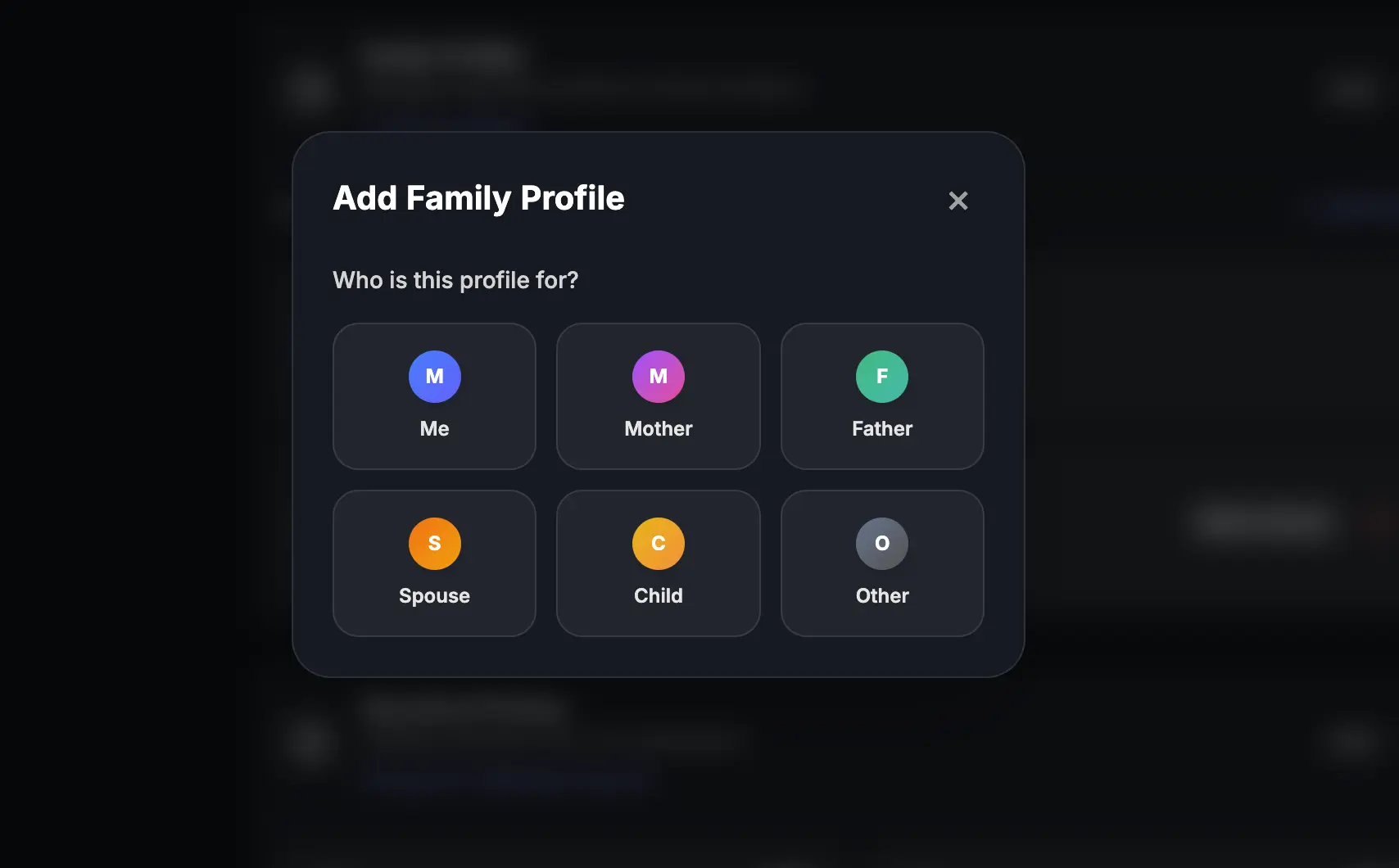
1. Family Profiles & Custom Entities
Create dedicated spaces for each member of your household. No more merging everything into one confusing bucket or signing in and out of different accounts.
- Pre-Mapped Relations: Instantly configure profiles for Self, Spouse, Mother, Father, or Child.
- Custom Entity Labels: Name custom profiles (e.g., "Grandpa", "HUF", or "Joint Account").
- Structured Entity Badging: Clean visual indicators highlight structure type at a glance: INDIVIDUAL JOINT CUSTOM
2. The "All Family" Aggregation Engine
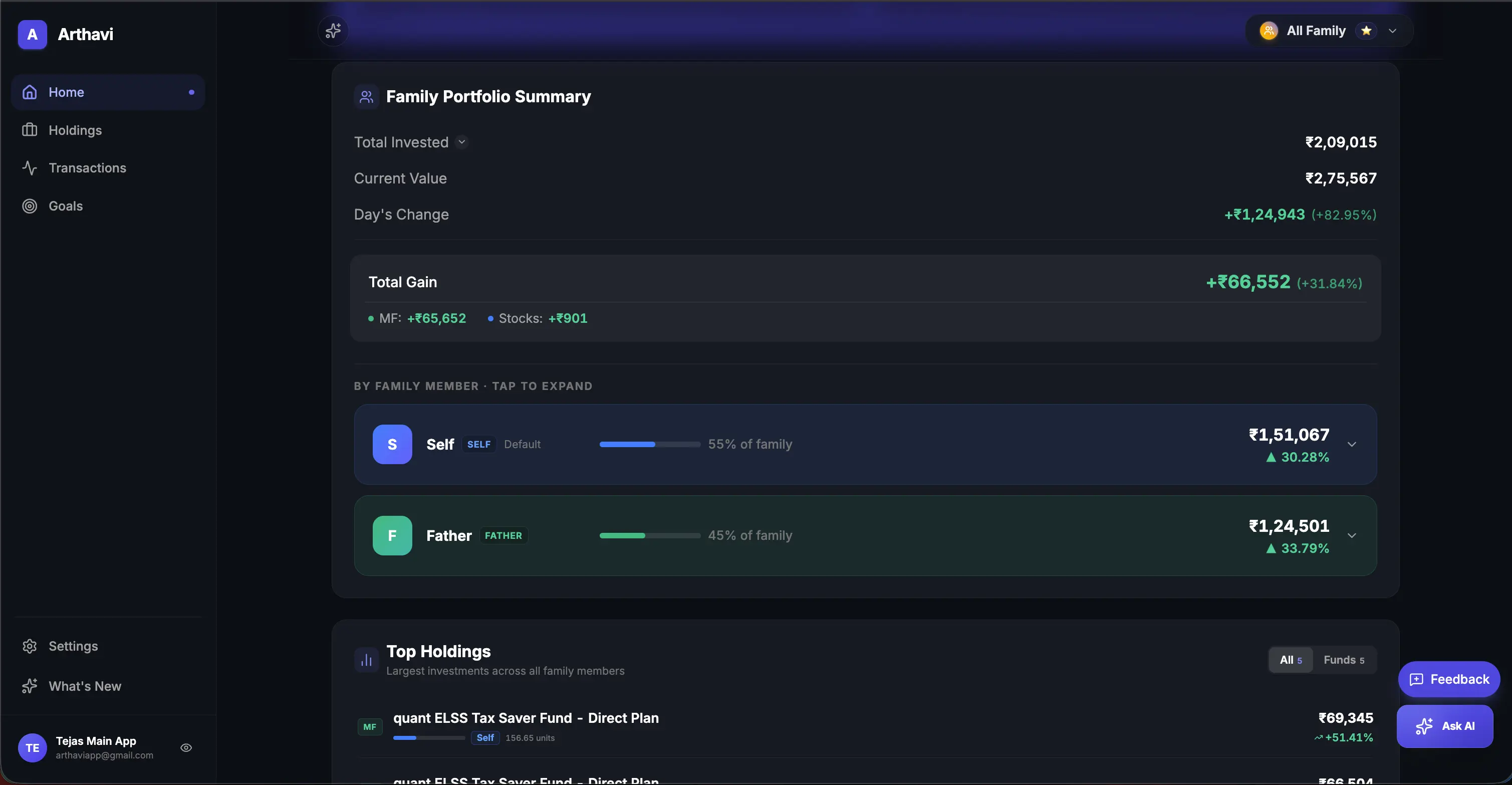
When you select the special "All Family" view, Arthavi acts as a consolidated data aggregator, dynamically pulling holdings, calculations, and performance metrics across every member profile.
- Consolidated Dashboard: See the sum total of your family net worth, aggregated invested capital, total lifetime returns, and combined day's changes.
- Merged Asset Allocation: View overall sector weights, mutual fund categories, and stock concentrations in a single aggregated chart.
- 👑 Top Holdings Widget: A brand-new card ranking the largest stock and mutual fund holdings across your entire family. Each row identifies who owns the asset using their personalized relationship avatar.
- Separated Goal Scopes: Keep your personal goals (e.g., "Rahul's New Laptop") private to your profile, while tracking collective family targets (e.g., "House Downpayment") on the aggregated dashboard.
3. Premium Switcher Experience
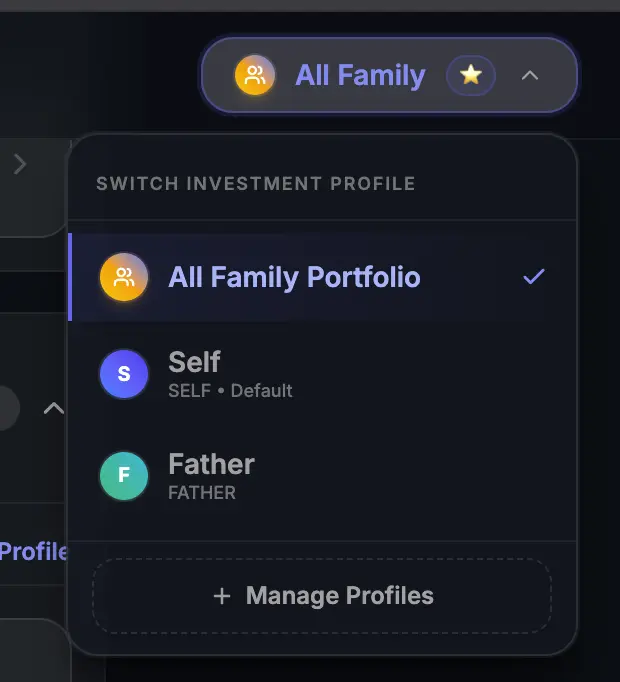
We designed the profile switcher to be visual and responsive. The switcher sits securely in your header bar, leveraging modern glassmorphism styling and backdrop filters.
- Custom Relationship Gradients: To help you identify the active account context instantly, every profile gets a premium linear gradient avatar:
Self (Cool Blue)Spouse (Warm Amber)Mother (Pink-Purple)All Family (Stellar Gold)
- Active Scoped Borders: Sidebars and settings highlights show active border indicators linking data to the selected individual.
- Switching Toast Feedback: A custom, haptic-style success banner notifies you exactly when profile contexts change in the background.
4. Safe Profile Deletion & DB Cleanup
Financial data integrity is crucial. We've built strict safety rules to ensure you never accidentally delete active investments or leave orphan records in the database.
- Checklist Safety Modal: If you attempt to delete a profile containing active assets, a modal pops up listing all blocking dependencies (Active Mutual Funds, Stocks, or Goals).
- Auto-Context Switch Shortcuts: The checklist displays links (e.g., Unlink Mutual Funds). Clicking them automatically switches the active switcher context to that profile and navigates you to the correct page to resolve them.
- Database Folio Cleanups: When deleting a scheme, the backend automatically drops empty parent `Folio`, `Portfolio`, and snapshot headers, keeping your database clean.
🛡️ The Privacy-First Difference
Most aggregator apps require you to share passwords to your demat accounts or connect your email inbox so their servers can scrape statement attachments. This exposes your family's sensitive data to third-party databases, advertisements, and lead generators.
Arthavi is different. Because our architecture relies on secure, local file parsing, you can upload multiple CAS statements and CSV holding exports directly. You never have to ask your family members for their broker PINs or passwords. They simply send you their monthly statement PDF, you drag-and-drop it into their respective profile, and you get complete analytics instantly.
🚀 How to Set Up Your Family Command Center
Setting up your family dashboard is simple and takes under five minutes:
- Add Profile: Go to your **Profile Settings** page, click "Add Profile", choose a relation, select a profile structure (Individual, Joint, or Custom), and save.
- Download Statements: Generate CAS statements from CAMS or KFintech for each member's PAN number.
- Upload Scoped Files: Select the member in the header dropdown switcher, navigate to "Import Statement", and upload their file. Repeat this step for each profile.
- View Aggregation: Switch to "All Family" to see your combined Net Worth, combined asset allocation charts, and the consolidated Top Holdings list ranking your family's largest assets.
The Multi-Profile update is now live for all Arthavi users. Ditch the manual spreadsheets and start tracking your family's wealth safely today.
💡 Frequently Asked Questions about Family Wealth Aggregation
How do I securely track my spouse's investments in India?
To securely track your spouse's investments, request their CAMS/KFintech Consolidated Account Statement (CAS) PDF or export holdings CSV from brokers like Zerodha or Groww. Instead of sharing active login credentials or granting email access, upload these statements to a dedicated profile on Arthavi. This maintains a read-only, local-parsing secure view.
Can I combine Zerodha stocks and Groww mutual funds across family members?
Yes. By creating separate family member profiles in Arthavi, you can import mutual funds via CAMS/KFintech CAS statement uploads, and stock portfolios from Zerodha, Groww, or Angel One via CSV upload. Switching to the "All Family" dashboard consolidates these investments into a unified returns calculation (XIRR) and sector allocation chart.
What is the difference between personal and family goals?
Personal goals are scoped to individual family profiles (e.g., a child's education or personal vehicle) and are visible only when that specific profile is active. Family goals are collective targets (e.g., retirement fund or buying a home) that aggregate assets across all profile holdings and are displayed on the consolidated "All Family" dashboard.
Is my family's financial data secure during aggregation?
Yes, Arthavi uses strict privacy-first parsing. Financial statements are processed locally on your device or via secure, encrypted connections. Because Arthavi does not utilize active broker APIs or store credentials, there is zero risk of unauthorized trade execution or leakage of account control.
Consolidate Your Family's Portfolios Today
Experience India's most secure family net worth tracking. Completely free and ad-free.
Create Free Account